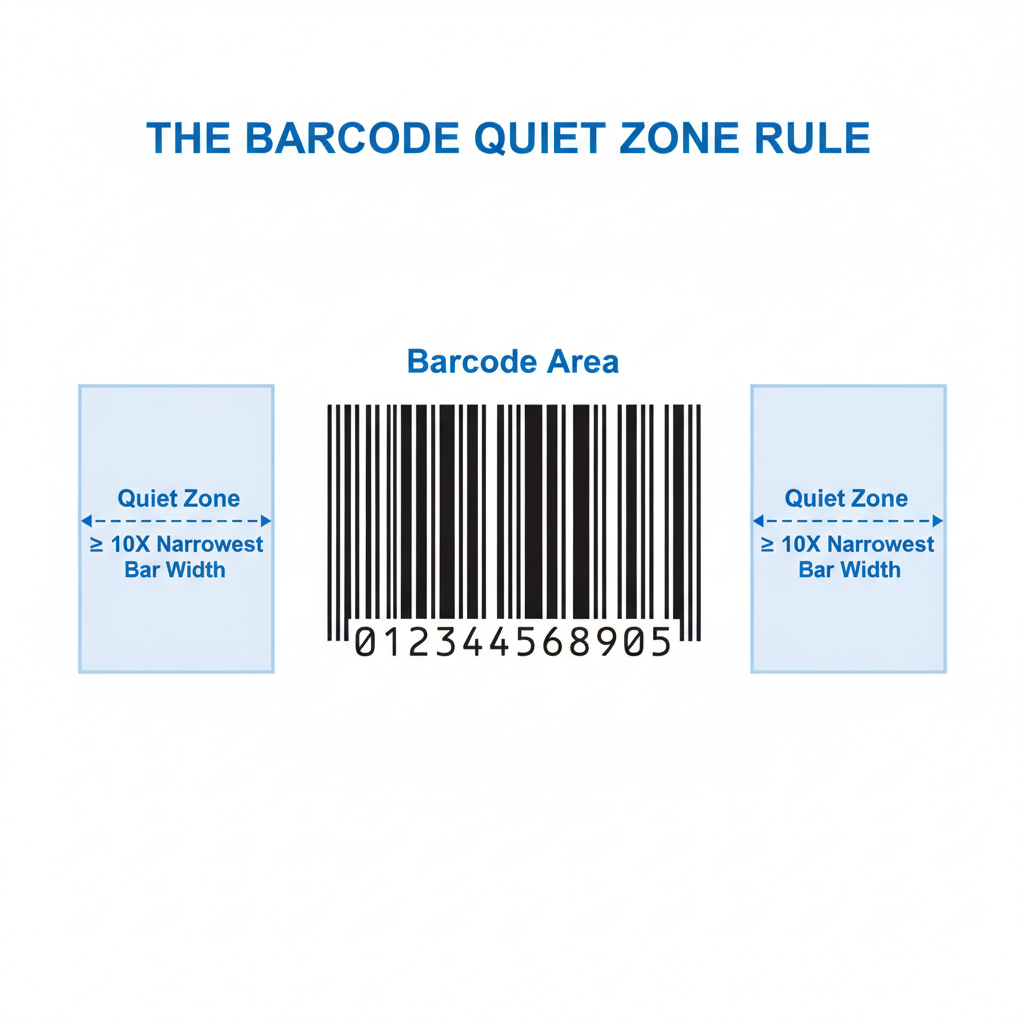
A quiet zone is the blank, unprinted margin that must surround every barcode on all sides. It gives a scanner's optical sensor a clear reference point so it can distinguish the first and last bars (or modules) from the surrounding label content. Label Toolkit automatically reserves and displays quiet zones in the browser designer so your barcodes scan on the first pass, every time.
- A quiet zone is not decorative whitespace; it is a functional specification defined in each barcode standard, and printing over it causes scan failures.
- Minimum widths vary by symbology: 10x the narrow bar width for 1D codes such as Code 128, and 4 modules for 2D codes such as QR and Data Matrix.
- At 203 dpi (8 dots per mm), a 10x quiet zone on a Code 128 with a 0.25 mm narrow bar requires at least 2.5 mm of clear space on the left and right.
- Label Toolkit's designer draws a visual quiet-zone boundary and warns you before export if any object overlaps it.
Why does a quiet zone exist?
Every barcode scanner, whether a simple CCD reader or a modern imaging engine, works by detecting the contrast ratio between dark bars and light spaces. The scan line needs a defined starting point before the first bar and a defined ending point after the last bar. Without enough blank space, the scanner's algorithm cannot reliably detect the "start" and "stop" patterns, and the decode attempt either fails or returns a garbled string.
Think of it like sentence punctuation. The words make sense only because there is white space before the first letter and after the final period. Remove those margins and the text runs together.
Scanner firmware typically looks for a run of reflective (light) signal that is at least as long as the required quiet zone before it commits to a decode attempt. If the run is shorter, many decoders simply skip that scan line entirely. This is why a barcode that looks perfect to the human eye can still fail in production when a border, logo, or neighbouring barcode encroaches on the margin.
How wide does a quiet zone need to be?
Every major barcode standard specifies its own minimum. The table below covers the symbologies you are most likely to encounter on shipping and product labels. All measurements assume the minimum specification; going larger is always safer.
| Symbology | Left quiet zone | Right quiet zone | Top / Bottom | Expressed as |
|---|
| Code 128 / GS1-128 | 10x narrow bar (X dimension) | 10x narrow bar | N/A (1D) | Min 2.54 mm at X=0.254 mm |
| Code 39 | 10x X dimension | 10x X dimension | N/A (1D) | Same formula as Code 128 |
| UPC-A / EAN-13 | 11x X dimension (UPC-A left) | 7x X dimension | N/A (1D) | Min ~3.63 mm left, ~2.31 mm right at nominal size |
| ITF-14 | 10x X dimension | 10x X dimension | N/A (1D) | Often printed with a bearer bar instead |
| QR Code (ISO/IEC 18004) | 4 modules | 4 modules | 4 modules each side | ~4 mm at 1 mm/module; scales with module size |
| Data Matrix (ISO/IEC 16022) | 1 module (L-shape finder side) | 1 module minimum | 1 module minimum | Typically ≥1 mm at small sizes; larger is safer |
| PDF417 | 2x X dimension | 2x X dimension | 2x row height | Narrower than most 1D codes; still mandatory |
Sources: GS1 General Specifications for UPC, EAN, ITF-14, and GS1-128; ISO/IEC 18004:2015 for QR Code.
What is the X dimension and why does it matter?
The X dimension is the width of the narrowest element in a 1D barcode, usually the narrowest bar or space. It is the fundamental unit from which all other measurements in the barcode scale. Quiet zones are defined as multiples of X, so if you change the X dimension (by scaling the barcode up or down), the required quiet zone changes with it.
At 203 dpi (dots per inch), one dot is approximately 0.125 mm. A typical Code 128 narrow bar is 2 dots wide, giving an X dimension of 0.25 mm. The minimum quiet zone of 10x is therefore 2.5 mm, which is 20 dots. At 300 dpi, one dot is roughly 0.085 mm. That same 2-dot narrow bar becomes 0.169 mm, and the 10x quiet zone drops to 1.69 mm, about 20 dots again but physically smaller.
This is why higher-resolution printing does not automatically mean you can shrink quiet zones in absolute millimetres: the zones scale with the barcode, not with the printer resolution.
Quiet zones in ZPL: what the printer actually does
When you write a Code 128 barcode in ZPL using the ^BC command, the printer firmware draws the barcode starting from the field origin set by ^FO. The barcode image itself does NOT include the quiet zone. The quiet zone is your responsibility as the label designer: you must leave enough blank label space around the ^FO coordinates.
A minimal ZPL snippet placing a Code 128 with an adequate quiet zone might look like this:
^XA
^FO40,30
^BCN,80,Y,N,N
^FD123456789012^FS
^XZ
Here ^FO40,30 positions the field origin at x=40 dots, y=30 dots from the label edge. At 203 dpi that is roughly 5 mm from the left edge, comfortably exceeding the 2.5 mm minimum quiet zone for a typical narrow bar width. If you position the barcode at ^FO0,0 with no left margin, the left quiet zone is zero and the barcode will likely fail to scan.
For a full breakdown of how ^BC parameters work, see the Code 128 ZPL command reference for ^BC. For field positioning, the ^FO field origin command guide covers every parameter in detail.
Quiet zones for 2D barcodes: QR Code and Data Matrix
2D barcodes are read by imaging engines rather than laser line scanners, but they still require quiet zones. The scanner firmware looks for the finder pattern (the three corner squares in QR Code, or the L-shaped solid border in Data Matrix) against a clean background. Any printing within the quiet zone can be mistaken for part of the symbol and corrupt the decode.
For QR Code, ISO/IEC 18004 specifies a minimum of 4 modules of clear space on all four sides. A module is one data cell in the QR grid. If you are printing a Version 1 QR Code (21x21 modules) at 1 mm per module, the symbol is 21 mm wide and the quiet zone adds 4 mm on each side, making the total footprint 29 mm wide. Scale to 0.5 mm per module and the quiet zone is 2 mm on each side.
Data Matrix has a somewhat smaller required quiet zone: the standard specifies at least 1 module (one quiet zone cell) on all sides, but most scanner manufacturers recommend 2 modules in practice for reliable decoding on curved or reflective surfaces.
The differences between QR and Data Matrix, including their finder patterns and data capacity, are covered in depth in the QR Code vs Data Matrix comparison guide.
What happens when a quiet zone is violated?
The consequences depend on how much of the quiet zone is consumed and what is printing into it.
- Partial violation (less than 30% of the required zone): Many modern area imagers will still decode, especially in good lighting, because their algorithms apply contrast correction. However, scan rates drop, and industrial scanners operating at high speed or at an angle will fail more often.
- Severe violation (printing overlaps the first or last bar): Decode failure is near-universal. The scanner sees an extended bar rather than a clean edge, and cannot identify the start or stop character.
- Adjacent barcodes too close together: Scanners may attempt to decode across both barcodes as if they were one symbol, generating a false read. This is particularly dangerous on product labels where a wrong barcode value could mispick inventory or trigger a GS1 compliance rejection.
How Label Toolkit handles quiet zones
Label Toolkit's browser designer renders a visual quiet-zone indicator around every barcode element on the canvas. The indicator shows as a light-shaded boundary that extends the required minimum distance beyond the barcode bars or modules. If another element, such as a text field, logo, or border, overlaps that boundary, the designer highlights the conflict before you export or print.
When you export to PDF, the quiet zone is preserved as blank white space around the barcode. When you export to ZPL, the field origin coordinates are calculated to include the required margin relative to the label edge, so you do not need to manually offset coordinates. This prevents the most common quiet-zone mistake, which is placing a barcode flush against the label border or a design element.
Practical tips for quiet zones on physical labels
- Measure your label stock, not just your design. Label stock sometimes has a coloured liner or registration marks near the edge. Even if your digital design has a correct quiet zone, a physical edge or pre-printed liner mark can encroach on it after die-cutting.
- Use a bearer bar for ITF-14. GS1 recommends a bearer bar (a solid rectangular border around the barcode) for ITF-14 instead of relying on label edge whitespace, because corrugated carton surfaces are irregular. The bearer bar protects the quiet zone and also prevents partial scans.
- Add extra margin on thermal printers. Thermal print heads age unevenly, and edge dots often produce lighter print. A quiet zone that is exactly at the minimum may degrade over time as the label stock area near the edge picks up ribbon contamination or abrasion. Adding 20 to 30% extra quiet-zone width costs almost nothing and significantly improves long-term scan reliability.
- Verify with a barcode verifier, not just a scanner. A consumer scanner will read a marginal barcode because its firmware is tuned for tolerance. A GS1-compliant barcode verifier grades quiet zones as part of the ISO 15416 (1D) or ISO 15415 (2D) quality report and will flag a minimum-violation that a handheld scanner would silently accept today but reject when dirty or at an angle tomorrow.
- Check quiet zones after scaling. If you scale a barcode in your design software to fit a smaller label, the absolute quiet-zone distance shrinks with the barcode. Reconfirm the minimum after any resize.
Frequently asked questions
What is a quiet zone in a barcode?
A quiet zone is the mandatory blank margin that must surround a barcode on all sides. It is defined in the barcode's technical standard and gives the scanner's sensor a clean reference point before and after the symbol. Without a sufficient quiet zone, scanners cannot reliably locate the barcode edges and decode attempts fail.
How wide does a barcode quiet zone need to be?
For most 1D linear barcodes such as Code 128, Code 39, and ITF-14, the minimum is 10 times the X dimension (narrowest bar width) on the left and right sides. For QR Code, the minimum is 4 modules on all four sides. For Data Matrix, the minimum is 1 module on all sides, though 2 modules is the practical recommendation.
Does a quiet zone have to be white?
No, but it must be the background colour of the label and must contrast clearly with the barcode bars. On a white label, the quiet zone is white. On a silver or coloured label, it should match the label background. What matters is that the quiet zone reflects the same amount of light as the spaces within the barcode itself, so the scanner's contrast detection works correctly.
Can I print text or a logo next to a barcode?
Yes, as long as the text or logo stays outside the required quiet zone. Measure from the last bar or outermost module to the nearest edge of any neighbouring element. If that distance is at least the minimum quiet-zone width for that symbology, the design is compliant. Label Toolkit shows the quiet-zone boundary visually so you can position elements accurately without manual measurement.
Why does my barcode scan in the office but fail at the warehouse dock door?
Dock-door scanners typically operate at longer range, in higher ambient light, and often at an oblique angle. These conditions reduce the effective contrast ratio the scanner sees, making a marginal quiet zone that passes in ideal conditions fail in the field. The fix is to increase the quiet zone to at least 1.5x the minimum and to verify the barcode grade with an ISO verifier rather than relying on a handheld scanner pass as proof of compliance.
Ready to design labels with correctly sized quiet zones built in? Start free with Label Toolkit and the browser designer handles the margins for you, so your barcodes scan right the first time.
Related reading: What Is a GTIN? Global Trade Item Numbers Explained for Retailers and Brands
Related reading: Code 128 vs Code 39: Which Linear Barcode Is Right for Your Labels