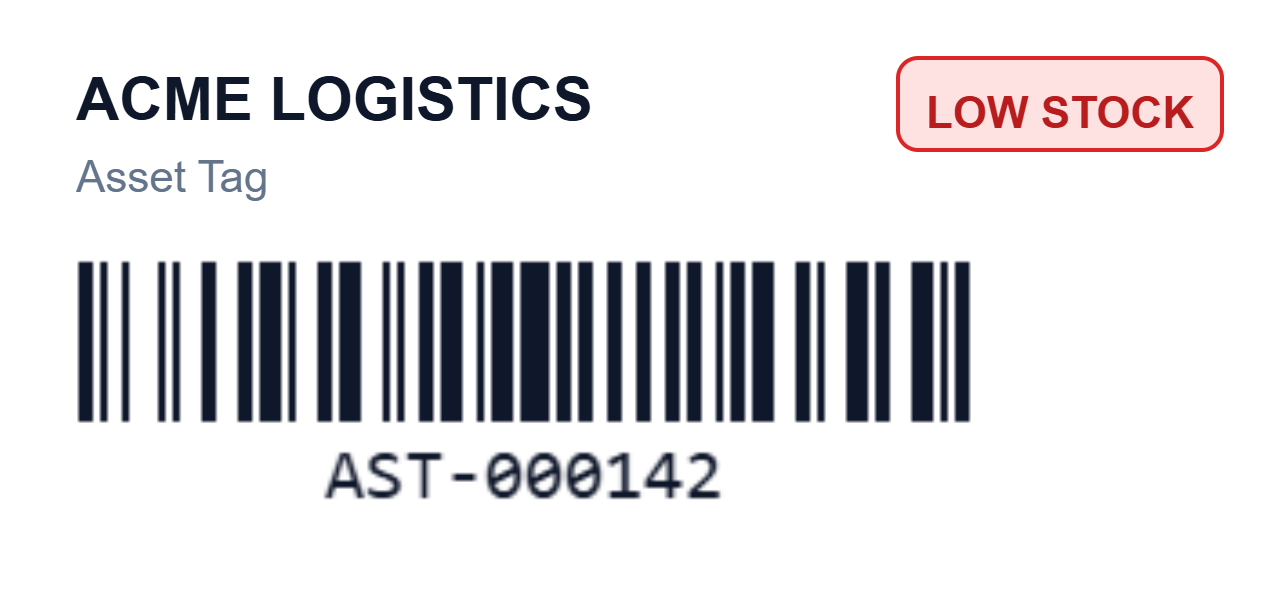
Printing one label is easy. Printing a thousand, each slightly different, is where a label tool earns its keep. Two new data-merge features handle the two most common "each one is different" needs: an auto-increment serial number that changes on every label, and conditional fields that appear only on the rows you choose.
An auto-increment counter with your own prefix, suffix and zero-padding.
Conditional visibility, so an element shows only when a rule is true.
Both work across vector PDF, browser print and ZPL, and export every row to one PDF.
An asset tag with an auto-numbered serial in the barcode and a conditional LOW STOCK badge.
A different number on every label
Turn on the serial counter and insert it anywhere as a merge field. Every printed label steps the number by one, so a run of asset tags reads AST-000142, AST-000143, AST-000144, and so on. You control the parts that matter:
Prefix and suffix: wrap the number, for example AST- in front.
Zero-padding: keep a fixed width so 42 prints as 000142 and sorts correctly.
Start and step: begin at any value and count by one, or by any interval.
Because the counter is an ordinary merge field, you can drop it into a barcode as easily as into text, so each label carries a unique, scannable serial.
Show an element only when it matters
Conditional visibility attaches a simple rule to any element: show it only when a field meets a condition. A "LOW STOCK" badge that appears only when the quantity is below a threshold. A "FRAGILE" flag only on rows marked fragile. An allergen warning only where the ingredient is present. On the canvas the element still shows, dimmed, so it stays easy to edit; at print time it appears only on the rows where the rule is true.
One export, every variation
Load a spreadsheet, and serial numbers and conditional rules apply per row automatically. Export the whole batch to a single vector PDF, one page per row, or send it to a Zebra printer as ZPL. The same design produces a thousand correct, individual labels in one step.
Try it
Open the Label Toolkit editor, load some data, and turn on the serial counter or add a condition to an element. It is free and needs no signup. New to merging data onto labels? Start with the template gallery.