← Back to Blog
Barcodes & QR Codes

What Is a GTIN? Global Trade Item Numbers Explained for Retailers and Brands

Olivia MorganAugust 19, 2026721 views

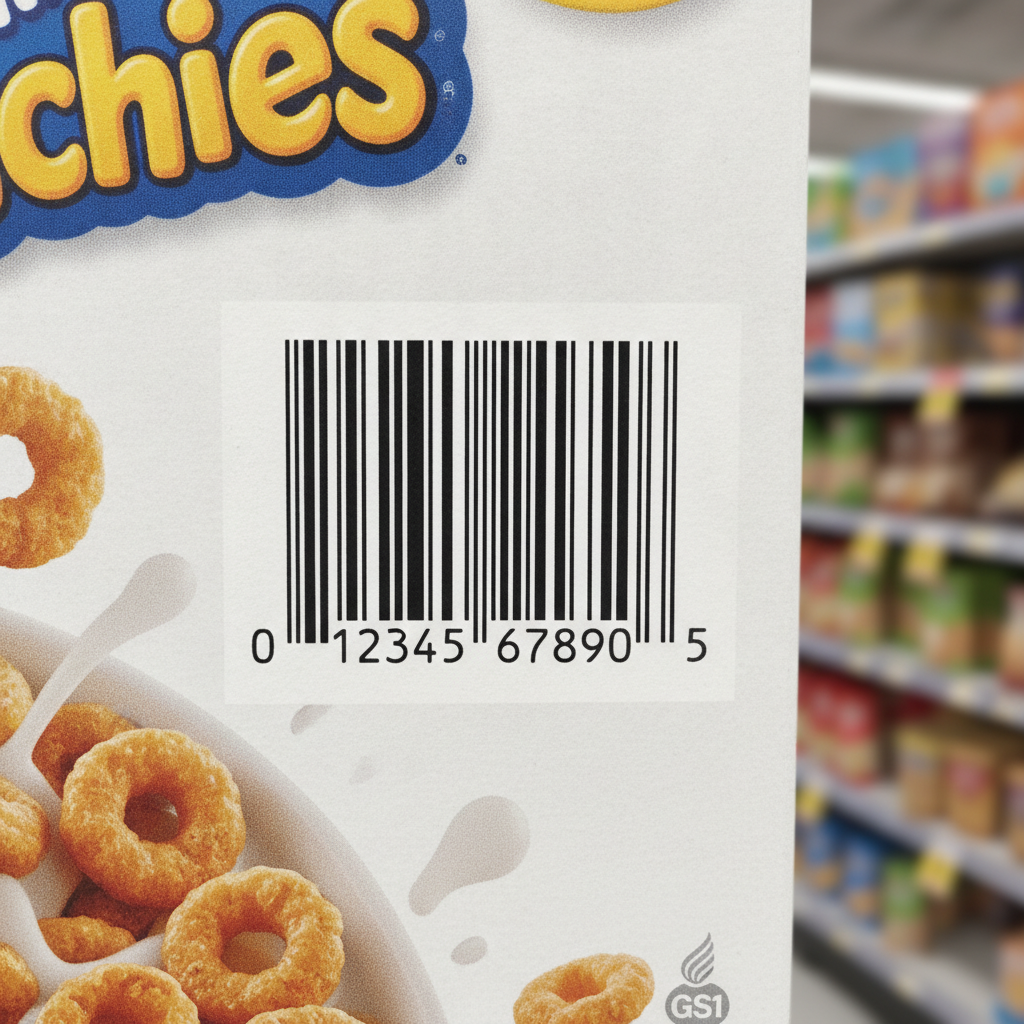
A GTIN (Global Trade Item Number) is a GS1-standardized numeric identifier that uniquely identifies a retail or commercial product anywhere in the world. GTINs come in four lengths: 8, 12, 13, and 14 digits. They are encoded into the barcodes you see on almost every product label, from grocery packaging to Amazon listings, and Label Toolkit lets you design and print those barcodes for free, right in your browser.

  • GTINs are not barcodes themselves; they are the data encoded inside barcodes such as UPC-A, EAN-13, GS1-128, and ITF-14.
  • The four GTIN formats (GTIN-8, GTIN-12, GTIN-13, GTIN-14) share one check-digit algorithm and are interconvertible by left-padding with zeros.
  • You must license a GS1 Company Prefix to issue GTINs that are globally unique; reselling or copying another company's prefix is a compliance violation.
  • Label Toolkit generates GTIN-bearing barcodes (UPC, EAN, GS1-128, ITF-14) in the browser with no install required, and exports to print-ready PDF or Zebra ZPL.

What does GTIN stand for, and where did it come from?

GTIN stands for Global Trade Item Number. The term was introduced by GS1, the not-for-profit standards body that administers product identification globally. Before 2001, the same concept was split across the American UPC system (12 digits) and the European EAN system (13 digits). GS1 unified them under the GTIN umbrella so that a single database field can hold any product identifier regardless of origin.

Every GTIN is built from a GS1 Company Prefix (licensed from a GS1 Member Organization), an Item Reference (assigned by the brand), and a single Check Digit calculated using the Luhn-adjacent Modulo-10 algorithm GS1 specifies. The check digit is not optional; scanners reject barcodes that fail the check.

The four GTIN formats compared

All four formats carry the same class of data. The differences are digit count, the barcode symbologies they appear in, and the packaging contexts they suit.

FormatTotal digitsCommon barcode symbologyTypical use case
GTIN-88EAN-8Very small consumer packaging where a full EAN-13 will not fit (lip balm, chewing gum)
GTIN-1212UPC-ANorth American retail point-of-sale; the classic 12-digit barcode on U.S. grocery products
GTIN-1313EAN-13Global retail POS; used on most products sold outside North America and on many global e-commerce platforms
GTIN-1414ITF-14, GS1-128Cases, cartons, and shipping units; the leading digit (1 to 8) indicates the packaging level

Conversion between formats is simple: left-pad the shorter GTIN with zeros until it reaches 14 digits. A GTIN-12 of 012345678905 becomes the GTIN-14 00012345678905. Retailers and marketplaces like Amazon store the 14-digit form internally so one field covers all variants.

How the check digit is calculated

The check digit is the last digit in any GTIN. To verify or generate it manually, follow the GS1 Modulo-10 procedure:

  1. Write out the GTIN without the check digit, starting from the left.
  2. Multiply each digit alternately by 3 and 1, starting with 3 applied to the rightmost payload digit (the one immediately left of where the check digit will go) and working left.
  3. Sum all the products.
  4. Find the smallest number that, added to the sum, produces a multiple of 10. That number is the check digit.

Example: for the 12-digit payload 01234567890, the weighted sum is 67. The next multiple of 10 is 70, so the check digit is 3, giving the full GTIN-12 012345678903. GS1 publishes a free online check-digit calculator you can use to verify any GTIN before printing.

Which barcode symbology carries a GTIN?

The GTIN is pure data. The barcode is the physical carrier. Choosing the right symbology depends on packaging type, trading-partner requirements, and the scanning environment. Our complete guide to barcode types and symbologies covers every major format in depth, but here is how the main GTIN carriers differ:

UPC-A (GTIN-12)

UPC-A is a linear (1D) barcode exactly 95 modules wide, printed at a nominal height of at least 25.9 mm (roughly 1.02 inches) for standard retail scanning. The minimum X-dimension (width of the narrowest bar) is 0.264 mm at 100% magnification. At 203 DPI, that is about 2.1 dots per module; at 300 DPI it is about 3.1 dots, which is why 300 DPI printers produce noticeably crisper UPC barcodes.

EAN-13 (GTIN-13)

EAN-13 is structurally almost identical to UPC-A but encodes 13 digits. The first digit is printed to the left of the bars rather than inside them, because the symbol itself only has 12 digit positions in the bar pattern. Retailers in Europe, Asia, and South America require EAN-13 by default.

ITF-14 (GTIN-14)

ITF-14 (Interleaved 2 of 5, 14 digits) is the dominant carton-level barcode. It is printed directly on corrugate, where ink spread (called bar width reduction) is unpredictable. GS1 therefore mandates a wider X-dimension of 1.016 mm nominal and a bearer bar (a rectangular frame) around the symbol to prevent partial scans. ITF-14 barcodes are not scanned at retail POS; they are used in receiving docks and warehouses.

GS1-128 (any GTIN length, plus additional data)

GS1-128 (formerly EAN-128) is a Code 128 barcode that uses Application Identifiers (AIs) to add structured data alongside the GTIN. AI (01) carries a GTIN-14. AI (17) carries an expiry date. AI (10) carries a lot number. A single GS1-128 label on a pharmaceutical case might encode all three in one barcode. Our barcode symbology guide covers GS1 Application Identifiers in detail.

GTINs on e-commerce platforms: Amazon, Google, and eBay

Amazon requires a valid GTIN for most product listings in its catalog. When you create a new ASIN, Amazon's system calls the GS1 registry to verify the GTIN belongs to your brand. Submitting a GTIN purchased from a third-party reseller (rather than licensed directly from GS1) triggers suppression of the listing. Google's free product listings and Google Shopping work the same way: the gtin feed attribute accepts GTIN-8, GTIN-12, GTIN-13, or GTIN-14, and Google validates format and check digit automatically.

eBay and many other marketplaces accept GTINs in the item specifics section and use them to auto-populate product details from a global catalog. If your product genuinely has no GTIN (handmade goods, custom B2B parts), most platforms have an exemption flow, but using a fabricated or borrowed GTIN instead of applying for an exemption is a policy violation.

How to get a GTIN for your product

  1. Join GS1 in your country. In the United States that means GS1 US. Membership fees scale with revenue, starting around $250 per year for the smallest tier, which licenses a prefix supporting up to 10 GTINs.
  2. Receive your GS1 Company Prefix. For example, a 7-digit prefix like 0614141 leaves 5 digits for item references on a GTIN-12, giving you up to 99,999 unique products.
  3. Assign item reference numbers. You pick any number not previously used. Keep a private registry so you never reuse a retired GTIN.
  4. Calculate the check digit using the Modulo-10 formula above or GS1's online tool.
  5. Register the GTIN in the GS1 Registry Platform (formerly known as the GS1 Cloud) so trading partners and marketplaces can resolve product details from the number.
  6. Design and print the barcode label using a tool like Label Toolkit, specifying the correct symbology for your packaging level (UPC-A for consumer units, ITF-14 for cases).

Encoding a GTIN on a label with Label Toolkit

Label Toolkit generates all major GTIN-carrying symbologies directly in the browser. No software installation is needed. Here is the practical workflow:

  1. Open the designer at Label Toolkit Designer and choose your label size (for example, 4 x 6 inches for a shipping label, or 2.25 x 1.25 inches for a small retail price tag).
  2. Click Add Barcode and select the symbology: UPC-A for a consumer GTIN-12, EAN-13 for a GTIN-13, or ITF-14 for a case GTIN-14.
  3. Enter your GTIN in the data field. Label Toolkit validates the check digit in real time and highlights any error before you print.
  4. Set the X-dimension. For a 203 DPI Zebra printer, a safe X-dimension for UPC-A is 0.33 mm (roughly 2.6 dots). At 300 DPI, 0.27 mm (about 3.2 dots) is clean and well within GS1 spec.
  5. Export to PDF for desktop printing or ZPL for direct-to-printer output on a Zebra thermal label printer. The ZPL output uses ^XA to open the label, ^FO to position the barcode field, ^BC for Code 128 or GS1-128, and ^XZ to close the format.
  6. If you need to print GTINs across hundreds of SKUs, use the data-merge feature: upload a CSV with a GTIN column and Label Toolkit generates one barcode per row automatically.

GTIN vs UPC vs EAN vs ISBN: sorting out the terminology

These terms trip up a lot of people because they refer to overlapping concepts at different levels of abstraction:

TermWhat it isRelationship to GTIN
GTINThe umbrella identifier standard (GS1)The parent concept
UPC (GTIN-12)12-digit American product code; the original retail barcodeA specific GTIN format
EAN (GTIN-13)13-digit European Article Number; now used worldwideA specific GTIN format
ISBN-13Book identifier; 13-digit, prefixed 978 or 979A GTIN-13 with a reserved prefix
ISSNPeriodical identifier; 8 digitsConverted to GTIN-13 with prefix 977 for barcode use
SKUStock Keeping Unit; internal retailer codeNot a GTIN; entirely private and non-standardized

The practical takeaway: if a trading partner or marketplace says "we need a GTIN," they want a GS1-issued UPC, EAN, or EAN-8. An internal SKU does not satisfy that requirement.

Common GTIN mistakes and how to avoid them

  • Reusing a retired GTIN. Once a GTIN is assigned to a product and that product is discontinued, GS1 recommends not reassigning the number for at least 30 years. Reuse causes catalog confusion in retailer databases.
  • Wrong symbology for the packaging level. Printing a UPC-A on a shipping carton instead of an ITF-14 or GS1-128 will confuse warehouse scanners that expect a 14-digit GTIN with a packaging indicator.
  • Quiet zone violations. The quiet zone is the blank space on either side of a barcode that tells the scanner where the symbol starts and ends. UPC-A requires at least 9 X-dimensions of quiet zone on the left and 9 on the right. Crowding text or artwork into that margin causes scan failures. See our dedicated article on quiet zone requirements for barcodes for exact measurements.
  • Printing below minimum size. GS1 specifies a magnification range of 80% to 200% for UPC-A. At 80%, the symbol is 25.9 mm wide. Going smaller risks rejection at retail scan verification.
  • Using a third-party GTIN reseller. Some websites sell GTINs without a proper GS1 Company Prefix. Amazon, in particular, cross-checks ownership against the GS1 registry and will suppress listings that fail.

Frequently asked questions

Is a GTIN the same as a barcode?

No. A GTIN is the number (the data). A barcode is the machine-readable symbol that encodes that number. The same GTIN can be encoded in multiple symbologies: a UPC-A, an EAN-13, or a GS1-128 can all carry the same underlying GTIN digits, just in different visual formats.

Can I use any 12-digit number as a GTIN-12?

No. A valid GTIN-12 must contain a GS1-licensed Company Prefix issued to your organization. Using a random 12-digit number, even one with a valid check digit, is not a legitimate GTIN and will be rejected by retail systems and marketplaces that validate against the GS1 registry.

How many GTINs do I need for product variations?

Each distinct product variant that a consumer could buy separately needs its own unique GTIN. A T-shirt in small, medium, and large in two colors requires six GTINs. GS1 provides detailed GTIN allocation rules specifying exactly when a new GTIN is required versus when the same GTIN applies.

What is a GTIN-14 packaging indicator digit?

The first digit of a GTIN-14 is the packaging indicator, a number from 1 to 8 that signals which level of trade item the barcode represents (1 for an inner pack, 2 for a case, and so on). A zero in that position means the GTIN-14 is simply a zero-padded GTIN-13 or GTIN-12 for a consumer unit.

Does Label Toolkit validate GTINs before I print?

Yes. Label Toolkit checks the check digit in real time as you type the GTIN into the barcode field. If the check digit is wrong, the designer flags the error before you export, so you catch the mistake at design time rather than after printing a full roll of labels.

Ready to design barcode labels with your GTINs? Create a free Label Toolkit account and start encoding UPC, EAN, GS1-128, and ITF-14 barcodes in your browser in minutes, no installation needed.

Related reading: Code 128 vs Code 39: Which Linear Barcode Is Right for Your Labels

#what is a GTIN #GTIN #GS1 #UPC #EAN #GTIN-14 #barcode types #GS1-128 #ITF-14 #product labels
OM
Written by Olivia Morgan
View profile →